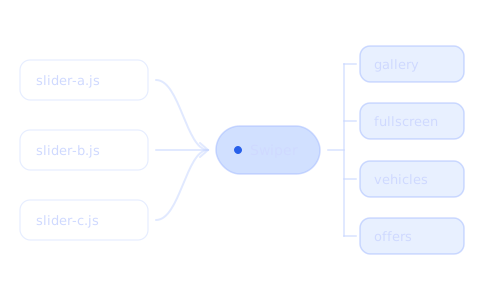

superauto.pl is a site with car offers – new, used, ex-lease cars and trucks. I worked on it at Arris Agency, and the biggest ordered rebuild I did there was replacing three different carousels with one. It went live in spring 2025, step by step. The situation is real, but the code below is simplified examples, not the code from the site.
Three carousels, three different codes
Each of the three carousels had its own code, written from scratch for one element of the page. They behaved in a similar way, but each one was heavy and each one had to be fixed separately. I suggested Swiper: it loads images in advance and is easy to edit.
The hardest part at the beginning was thinking through the logic. One component had to handle four places: the car gallery with thumbnails, the full-screen photo view, the carousel of vehicle cards and the carousel of small offers. I made one pattern and described the differences as variants of settings:
import Swiper from 'swiper'
import { Navigation, Thumbs } from 'swiper/modules'

// settings shared by every carousel on the site
const base = {
  modules: [Navigation, Thumbs],
  lazyPreloadPrevNext: 1, // the next photo loads in advance
}

// variants differ only in settings
const variants = {
  gallery: { slidesPerView: 1 },
  vehicles: {
    slidesPerView: 1.2,
    spaceBetween: 16,
    breakpoints: { 1024: { slidesPerView: 3 } },
  },
  offers: { slidesPerView: 1 },
}

export function createCarousel(el, extra = {}) {
  const variant = variants[el.dataset.carousel] ?? variants.gallery

  return new Swiper(el, {
    ...base,
    ...variant,
    navigation: {
      prevEl: el.querySelector('[data-prev]'),
      nextEl: el.querySelector('[data-next]'),
    },
    ...extra,
  })
}
The extensions are just extra settings. The car gallery gets a second, small carousel with thumbnails, and the full-screen view is the same carousel with bigger photos, opened on the clicked photo:
const thumbs = new Swiper(thumbsEl, {
  slidesPerView: 6,
  spaceBetween: 8,
  watchSlidesProgress: true,
})

createCarousel(galleryEl, { thumbs: { swiper: thumbs } })
createCarousel(fullscreenEl, { initialSlide: clickedIndex })
A dozen carousels on one page
On offer lists every card has its own small gallery. With a dozen or more offers on a page, there are a dozen or more carousels at the same time. On some computers the carousel started to stutter, and at first it looked like there were simply too many carousels.

It turned out that the number of carousels wasn't the problem. The background was. Photos load in two steps: first a small low-quality preview with a blur filter appears underneath, and after a moment the full version. The blur filter is expensive for the browser, and when the carousel moved, slower computers couldn't keep up.
I didn't want to remove this effect. What helped was a CSS rule that moved the blurred background to a separate layer handled by the graphics card. I think it was transform: translateZ(0), but I don't remember exactly any more:
/* blurred preview under the photo – waits until the full version loads */
.offer-card__preview {
  filter: blur(12px);
  /* separate layer: the blur isn't painted again when the carousel moves */
  transform: translateZ(0);
}
The server generates the images
The server prepared all image sizes, so I adjusted to what I got from the backend. The backend also made sure that the number of images wouldn't overload the server. When we were making the mobile version faster and added smaller images in srcset, suddenly there were a lot of thumbnails. Generating new sizes for all photos in every offer overloaded the server and filled up the disk, so the generation stopped. Later it took more than an hour.
<img
  src="/photos/offer-1234/1-800.jpg"
  srcset="/photos/offer-1234/1-400.jpg 400w, /photos/offer-1234/1-800.jpg 800w"
  sizes="(max-width: 640px) 100vw, 400px"
  loading="lazy"
  alt="Sample car from an offer"
>
Every size in srcset is a separate file for every photo in every offer. On a site with a lot of offers, one extra size means a lot of new files at once.
Going live step by step
The new carousel went live step by step. I didn't have a list of the places where carousels appear, so I looked for them in the code. Every type of offer – new, used, ex-lease cars and trucks – had its own template files, so I made the same change in several places. In my opinion one template would be enough, showing only the sections that fit a given offer. Still, I adjusted to the code that was already there, and I passed on the idea of one template as a suggestion.
What came out of it
- One Swiper component instead of three carousels with their own code – you make a change in one place.
- Stuttering doesn't always come from the number of elements. Sometimes one expensive effect is to blame, like
filter: blur(). - Every new image size is extra work for the server – it's worth agreeing on the sizes with the backend before you add
srcset. - Before a change like this, a list of the places where the element appears helps a lot.