
AgrestApp was on Tailwind 3, and quite a few things didn't work as they should. At some point I got an audit with a huge list of changes: about 250 buttons to fix, tables and much more. The list said, among other things, that the buttons had too small text and the form fields had 14 px text, so an iPhone zooms in when you tap a field. I suggested making these elements bigger on touch screens with the pointer-coarse: variant – something new in Tailwind v4. I warned that it would take time: I could fix everything by eye, or make the changes and clean up the app along the way. I got the go-ahead for the newer Tailwind and for a slow clean-up – e.g. replacing 3–4 buttons from separate components with one.
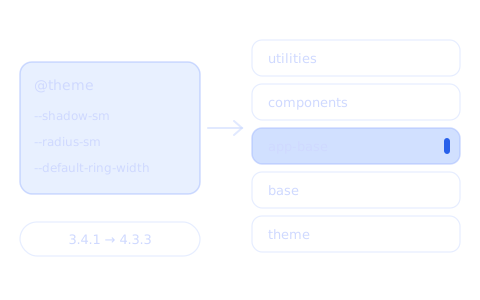
On 26 August I moved AgrestApp from Tailwind 3.4.1 to 4.3.3. It's a big project: the JavaScript config has about 200 colours and 11 breakpoints, and the templates have over 1,500 classes with an exclamation mark (!bg-…). The automatic migration tool suggested changes in 339 files and 1,710 lines. In the end 76 files changed, and most of the changed lines were in two lock files.
The rule: don't rewrite the templates
Tailwind v4 changed a few default values. I could fix every class in the templates or bring the old values back in one place. I chose the second option. The classes in the templates stayed as they were, and I described the differences between the versions in CSS:
@import "tailwindcss";
/* v4 still reads the JS config – colours and breakpoints stay the same */
@config "../../tailwind.config.cjs";

/* v4 rescaled these three values – I bring back the ones from v3 */
@theme {
  --shadow-sm: 0 1px 2px 0 rgb(0 0 0 / 0.05);
  --radius-sm: 0.125rem;
  --default-ring-width: 3px;
}

/* v4 changed the default border colour to currentcolor */
@layer base {
  *, ::after, ::before, ::backdrop, ::file-selector-button {
    border-color: var(--color-gray-200, currentcolor);
  }
}
These three values cover 296 classes in the templates: shadow-sm (226), rounded-sm (52) and plain ring (18). After the change they look exactly like in v3, and I didn't change a single character of them in the templates.
Two things in the dependencies only showed up when I compared the results:
- The forms plugin.
@tailwindcss/forms0.5.11 lowers the specificity of its selectors (input:where([type='text'])instead of[type='text']). After the update this moved the padding of every form field. I pinned version 0.5.7, which works as before. - Node 20. The new Tailwind engine needs Node 20 or newer, and on an older version the install fails with an error about a binary, not about Tailwind. I added
enginestopackage.jsonand an.nvmrcfile.
Three changes v4 needs
Some things couldn't be brought back in CSS. I had to change these in the templates:
*-opacity-*classes (bg-opacity-50,ring-opacity-5and so on) don't exist in v4 and generate nothing. I changed them to the slash syntax – 49 places in 36 files. Without this, the overlays under modals would lose their dimming, and a dropdown would get a black ring instead of an almost transparent one.<!-- before --> <div class="bg-black bg-opacity-50"> <!-- after --> <div class="bg-black/50">@referencein<style>blocks. In v4 every<style>block in a Vue component is compiled on its own and doesn't know the project's colours or classes, so@applyfails. I added one line in 32 files:<style scoped> @reference "../../css/app.css"; .badge { @apply rounded-sm bg-brand-1-100 px-2; } </style>@apply … !important. v4 doesn't accept!importantat the end of@apply. In one place I moved the exclamation mark to the single classes.
The ! prefix before a class, on the other hand, still works in v4, so over 1,500 of those classes stayed untouched.
The hardest part: CSS layers
The cascade took the most time. In v4 Tailwind's classes live in layers (@layer), and CSS outside a layer always wins over them, whatever the specificity. v3 didn't work like this, so rules that had been losing for years suddenly started to win:
- a
label { … }rule with a margin overrode themb-7.5class on a label, input { height: 36px }stretched checkboxes and radio buttons to 36 px.
The fix was a separate layer for element rules. It sits between base and components, so it wins over the reset and the forms plugin but loses to the classes – just like in v3:
/* layer order – it has to be at the very top of the stylesheet */
@layer theme, base, app-base, components, utilities;

@layer app-base {
  label {
    margin-bottom: 0.375rem;
  }

  /* checkboxes and radio buttons get their size from the forms plugin */
  input:not([type="checkbox"], [type="radio"]) {
    height: 36px;
  }
}
Two more differences only showed up when I clicked through the app:
- Modals hid under their own backdrop. In v3 the
transformclass added an empty transform, which created a new stacking context. In v4 the same class givestransform: nonewhen no transform is set. After the enter animation the modal fell under the backdrop, and a click on the modal closed it. This affected 33 files. One rule was enough:.transform { transform: translate(0, 0); }. - The gradient disappeared from the first dashboard tile. A custom
bg-gradient-<angle>plugin didn't set the--tw-gradient-positionvariable that v4 uses to build gradients. The whole value was invalid, so the tile had no background, just white text.
I also fixed the container class. v4 no longer reads the container's centring and padding from the JS config, so I added them in CSS with @utility container.
How I checked that nothing changed
Clicking through pages isn't enough – it's easy to miss a margin on one subpage. So I built the CSS from the branch with v3 and from the branch with v4 and compared both results: 90 stylesheets against 90, class by class and value by value.
The result:
- no class used in the templates is missing from the final CSS,
- almost all differences are just a different notation of the same value,
- two differences are on purpose: v4's default palette is in
oklchinstead ofrgb, andcontainerhas one extra width step from one of the breakpoints.
Finally, I left a note for the team: after pulling the changes you have to run npm ci, because the dev server won't start without the new packages.
What came out of it
- A migration without rewriting the templates – the old values in
@themeand three changes that v4 needs. - A separate
app-baselayer for element rules, so the cascade works like in v3. - Comparing the final CSS instead of clicking through pages – it shows for sure that nothing went missing.
- The project is ready for
pointer-coarse:, which started it all – I used it e.g. in the AgrestApp headers.